
Update:
Video streaming has changed significantly since this post was published in 2011. Enterprise video streaming providers understand that the online video industry has shifted towards creating valuable experiences for content publishers beyond YouTube and Facebook.
JW Player provides the most up-to-date video player technology to help publishers stream online videos across web and mobile devices. JW ensures that all industry standards are supported, from HLS & MPEG-DASH to VAST & VPAID.
Our cross-device HLS playback lets your audience access your content seamlessly on any HTML5 desktops and mobile apps. All JW Player’s streaming features are listed here.
Also check out this article on our support site for more information on adaptive streaming. A demo is also available that showcases JW Player loading fragments by comparing the bandwidth to the available video bitrates.
————————————————————————————————————————————————
With all of the buzz around HTML5 and the iPad, there’s been a lot of talk about the technologies underlying digital video. Besides the inevitable codecs (H264 & VP8), experts are discussing video delivery mechanisms, using indecipherable acronyms like RTMP, CDN and HLS. This blog post will give an overview of the various video streaming methods in plain English and bring the all-round developer and publisher up to date.
In a nutshell, there are three widely used ways to stream a video: Progressive Download, RTMP/RTSP Streaming, and Adaptive HTTP Streaming. We’ll look at the three in detail here, describing their pros, cons, and various technologies that support each.
Note: more streaming methods (like MultiCast or Peer 2 Peer) exist, but are of little use to the regular publisher. They are not widely adopted and/or only useful in specific situations.
Progressive Download
Progressive Download is the most widely used video delivery method by far (in part because it’s what YouTube uses). It’s also easiest to implement: just put a video on your webserver and point your player to the URL. Once a user hits play, the player immediately starts downloading the file. The player will start video playback as soon as it has enough data to do so, but it will continue to download until it has received the whole file (hence the progressive).
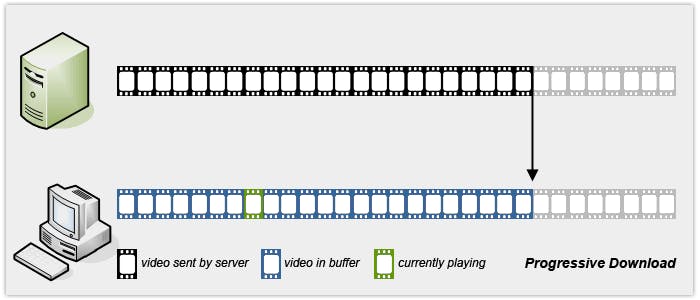
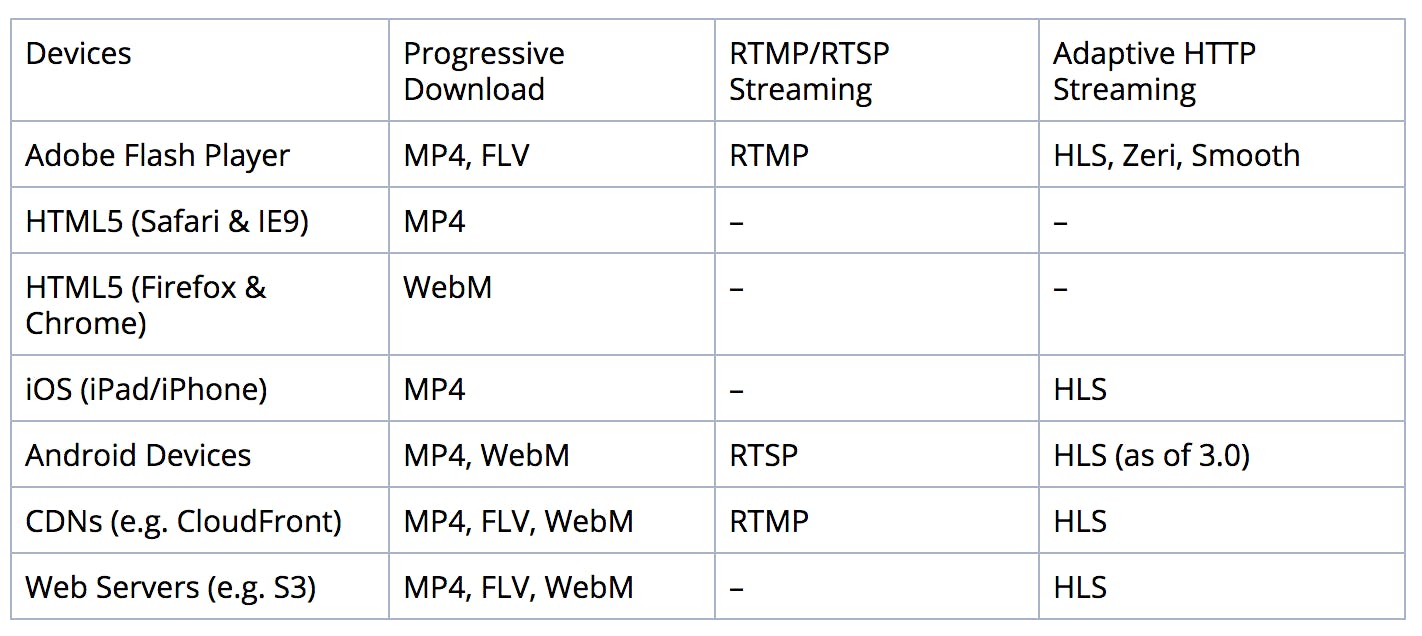
Progressive Download is supported by Flash, HTML5 browsers, the iPad/iPhone and Android. On the server side, every regular webhoster supports downloads, as does every CDN (Content Delivery Network; webhosters that special in large-scale delivery). In most cases (Flash needs a small server module), it is possible to seek in a player to a not-yet-downloaded part of the video. At that point, the player re-downloads the video, starting at the seek offset instead of at the beginning. We call that feature pseudo-streaming.
The simplicity of Progressive Download also has its downsides. For one, bandwidth is wasted on data downloaded but not watched. Consider a user watching a ten minute video. They may leave the page after having watched only one minute of the video, but at that point the other nine minutes have already been downloaded. This means that the publisher has paid to transfer nine times as much data as the user actually watched – an expensive proposition on a large scale.
Another downside is the inability to change the quality of the video mid-stream: once the download starts, the video quality is locked. After switching a player to fullscreen, you generally see a blurry video, because it was intended to be watched at a much smaller size. Or, when you watch video on an iPad, your connection may switch from WiFi to 3G. Playback then stutters, because the download speeds are much lower on 3G.
In sum, Progressive Download works fine for short clips (a few minutes). For longer videos, the downsides start to impact playback too much. Plus, live streaming is not possible, as there’s no downloadable file.
RTSP/RTMP Streaming
Because of the downsides of Progressive Download, RTMP/RTSP Streaming is widely used by professional media organizations like Hulu. This method uses specialized webservers that only deliver the frames of a video the user is currently watching. No data is downloaded in advance and data a user has seen is immediately discarded.
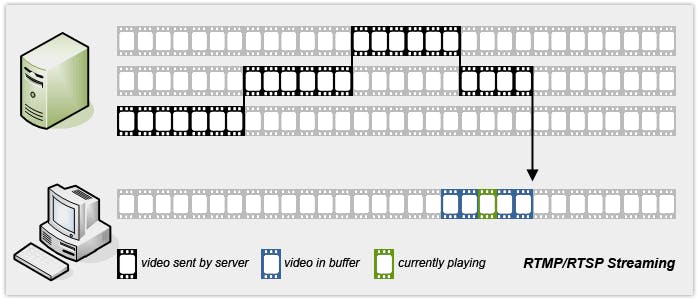
The most widely solution is used is RTMP (Real Time Messaging Protocol), the streaming protocol of Flash. It is supported by servers such as FMS and Wowza and most CDNs (but not by regular webhosters). HTML5 does not include a dedicated streaming protocol, nor does the iPad/iPhone. Android has support, for RTSP (Real Time Streaming Protocol). Unfortunately, RTSP is not widely supported by servers and CDNs.
This lack of support, especially on the server side, is the biggest drawback of RTMP/RTSP Streaming. Most publishers do not want to maintain expensive, dedicated servers to stream their videos. Additionally, the dedicated protocols (RTMP and RTSP) are often blocked by corporate firewalls.
On the plus side, RTMP streaming can change video quality mid-stream. This allows for optimal playback quality in the fullscreen and WiFi/3G scenarios described above. However, if the connection speed drops below the minimum bandwidth needed for the video, playback will be continuously interrupted. Unlike progressive download, users cannot pause a video and wait for enough data to download to ensure smooth playback.
In sum, RTMP/RTSP Streaming works great even for long-form or live video. It has specific server and protocol requirements, which makes it less accessible and adds significant complexity and cost as compared to Progressive Download.
Adaptive HTTP Streaming
Adaptive HTTP Streaming is a fairly new streaming format. It attempts to join the merits of RTMP/RTSP Streaming (bandwidth efficiency, quality switching) with those of Progressive Download (no special servers or protocol needed). Adaptive HTTP Streaming works by storing your videos on the server in small fragments (a few seconds each). The player then glues these fragments together into a continuous stream.
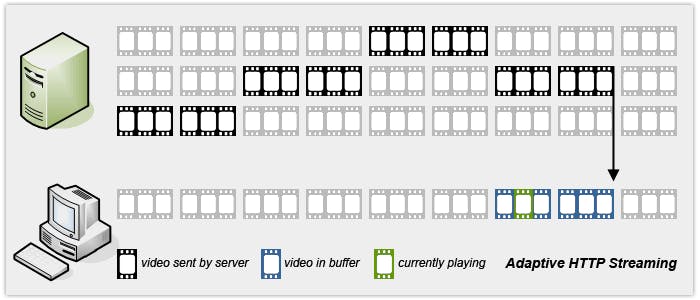
At present, Adaptive HTTP Streaming is supported by both Flash and the iPad/iPhone. Android supports it as of version 3 and support in HTML5 is currently under development. Since Adaptive HTTP Streaming leverages standard webservers, it is supported by webhosters and CDNs alike.
Although Adaptive HTTP Streaming eliminates many of the downsides of RTMP/RTSP Streaming and Progressive Download, it still has issues of its own, the biggest being the lack of standardization. Because it is a new technology, there is no single, widely used implementation. The most popular is currently Apple’s HLS (HTTP Live Streaming), which is supported by the iPad/iPhone and Android 3.0. However, both Adobe and Microsoft have competing offerings (Zeri & Smooth) and the MPEG consortium is working on a standard named DASH.
It’s also worth noting that none of the Adaptive HTTP Streaming implementations work with regular MP4 files. They all require your files to be converted from a regular MP4 into a specific fragmented format. Apple, Microsoft and Adobe each supply a tool for this, but support for these formats doesn’t exist in regular video editors and transcoding tools (yet).
In summary, while Adaptive HTTP Streaming will likely become the single video streaming method over time, the technology is still fragmented (no pun intended) and ecosystem support is only beginning to arrive.
Summary: Streaming Support
This table sums up support for the various streaming methods across devices and servers.